How TaoCore-Human Works (Math and Logic for Engineers)
This entry explains how taocore-human uses TaoCore’s math to analyze photos and videos. It’s meant to be understandable to engineers without data science background.
1. The pipeline in one sentence
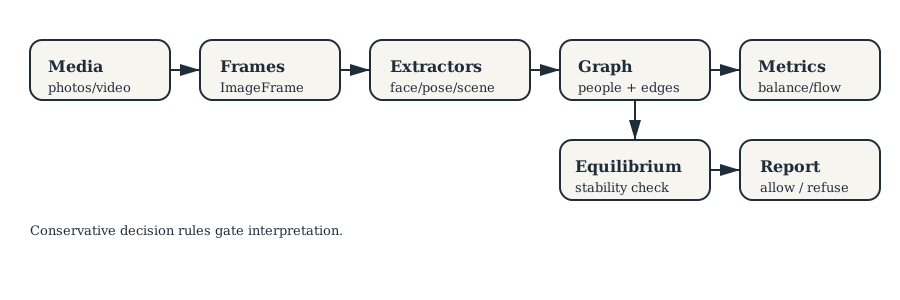
taocore-human turns media into measurable signals, builds a graph, runs stability metrics, then refuses to interpret when data quality is poor.
Pipeline map:
2. Inputs and adapters
Photo folders
- Input: a folder of images.
- The adapter enumerates supported image files, loads each with PIL or OpenCV, and yields
ImageFrameobjects. - Extractors produce signals per frame (faces, expressions, scene quality).
Implementation note: the adapter sorts paths deterministically so results are reproducible.
Data sketch:
image_01.jpg → ImageFrame(index=0, data=HxWxC)
image_02.jpg → ImageFrame(index=1, data=HxWxC)
...
Video
- Input: a video file.
- The adapter uses OpenCV to read frames, converts BGR→RGB, and yields
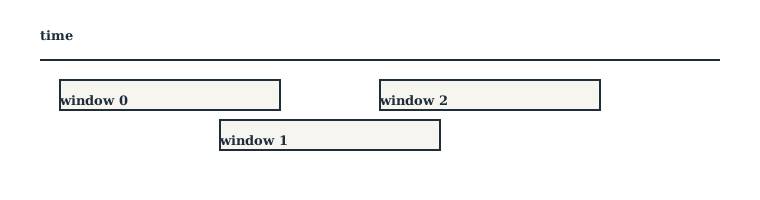
VideoFrame. get_windows()slices the video into overlapping windows withwindow_durationandwindow_overlap.
Windowing sketch:
3. Signals (extractors)
Extractors produce structured numeric signals:
- Face detection confidence
- Arousal/valence (as proxies, not ground truth)
- Scene illumination and blur (data quality)
By default the pipeline can use stub extractors to test without ML dependencies.
Implementation note: stub extractors are seeded, so runs are deterministic given the same seed.
Example FaceDetection (fields):
confidence=0.82
valence=0.3
arousal=0.6
smile_intensity=0.4
track_id="person_1"
4. Graph construction
Photo pipeline
- Each tracked person becomes a
PersonNodewith aggregated features like coverage ratio and confidence. - Edges connect people who co‑occur; weight is based on co‑occurrence frequency.
- The graph is a snapshot of “who appears with whom.”
Graph sketch:
person_1 —— person_2
     |
  person_3
Video pipeline
Two graph layers:
- Per‑window graphs (temporal)
- Aggregated graph (global)
Window nodes track temporal statistics like arousal/valence trends and group volatility. These signals feed the video report and rejection rules.
This lets us measure interaction stability over time, not just overall co‑occurrence.
5. Metrics applied
taocore-human reuses TaoCore metrics:
- BalanceMetric: are signals in plausible bounds?
- ClusterMetric: are there sub‑groups?
- HubMetric: who is structurally central?
- FlowMetric (video): are interactions coherent or volatile?
Metrics are descriptive. They don’t “label” people; they measure structure and dynamics.
6. Equilibrium solver
After metrics, the pipeline runs the fixed‑point iteration solver:
x_{t+1} = f(x_t)If the system doesn’t stabilize, the pipeline flags it as unreliable. This is intentionally conservative.
Pseudo‑code (simplified):
result = EquilibriumSolver.solve(graph_state)
if not result.converged:
  reject()
7. Conservative decision rules (safety)
The decider is intentionally strict:
- If no person has enough coverage/confidence → reject
- If equilibrium doesn’t converge → reject
- If temporal volatility is too high (video) → reject
Concrete thresholds (defaults):
- Photo:
min_images=3,min_coverage=0.3,min_confidence=0.5 - Video:
min_duration=10s,window_duration=5s,window_overlap=1s
Rejection reasons are accumulated and surfaced in the report, rather than hidden.
This makes “no interpretation” the default when data is weak.
8. Why this matters
The design is about bounded claims:
- Explicit uncertainty
- Structured failure modes
- No hidden inference steps
That’s what makes it safe enough to experiment with in real systems.
The report generator enforces careful language: it uses “signals” and “patterns,” and always attaches limitations and recommendations. Even when interpretation is allowed, it avoids definitive claims.
9. Evidence in the codebase
Tests and pipelines live here:
taocore_human/pipeline/for the main logictaocore_human/reports/generator.pyfor safety‑focused languagetaocore_human/nodes/for feature definitionstests/for edge cases and correctness
If you want, I can add a tutorial with example inputs/outputs.
10. Example walkthrough (small, concrete)
Imagine a folder with 3 photos:
photo_1.jpg: person_1, person_2
photo_2.jpg: person_1 only
photo_3.jpg: person_1, person_2
Step 1: Extract signals
Suppose the face extractor returns:
person_1: confidence [0.8, 0.7, 0.9], valence [0.2, 0.1, 0.3]
person_2: confidence [0.6, 0.7],      valence [-0.1, 0.0]
Step 2: Build person features
Coverage ratio:
person_1: 3 / 3 = 1.0
person_2: 2 / 3 = 0.67
Average confidence:
person_1: (0.8 + 0.7 + 0.9) / 3 = 0.80
person_2: (0.6 + 0.7) / 2 = 0.65
Both pass defaults (min_coverage=0.3, min_confidence=0.5).
Step 3: Build graph
Since person_1 and person_2 co‑occur twice, we add an edge:
person_1 —— person_2Step 4: Run metrics + equilibrium
- HubMetric: both nodes have equal degree (1).
- ClusterMetric: 1 cluster.
- Equilibrium: converges quickly (small graph, stable features).
Step 5: Decide + report
Because coverage/confidence are sufficient and equilibrium converged:
interpretation_allowed = True
confidence_level = "moderate"
If the video pipeline sees high volatility (e.g., arousal trend swinging wildly), it flips to reject even if the graph exists.